# ch08-配置属性
# 属性来源( property source)
- application.properties、application.yml:server.port = 8090
- 两个文件可以混用
- 命令行参数( commandLineArgs ):java -jar taco-cloud-sd-jdbc-0.0.3-SNAPSHOT.jar – server.port=8081
- 在程序中直接获取
- JVM系统属性:java -Dserver.port=8091 -jar taco-cloud-sd-jdbc-0.0.3-SNAPSHOT.jar
- 操作系统环境变量:set SERVER_PORT=8082、java -jar taco-cloud-sd-jdbc-0.0.3-SNAPSHOT.jar
# YAML文件
- 使用缩进表示层级关系,不允许使用Tab键,只允许使用空格
- # 表示注释,从这个字符一直到行尾,都会被解析器忽略。
- 对象,键值对,使用冒号结构表示
- animal: pets
- hash: { name: Steve, foo: bar }
- 数组,一组连词线开头的行,构成一个数组 - Cat - Dog - Goldfish
- 行内表示法:animal: [Cat, Dog]
#server:
#  port: 8443
#  ssl:
#    key-store: classpath:mykeys.p12
#    key-store-password: letmein
#    key-password: letmein
spring:
  datasource:
    driverClassName: "org.h2.Driver"
    url: "jdbc:h2:mem:tacocloud"
    username: sa
    password: sa

#    driver-class-name: com.mysql.cj.jdbc.Driver
#    url: jdbc:mysql://localhost:3306/tacocloud
#    username: root
#    password: exampledb20

#  sql:
#    init:
#      mode: always
#      schema-locations: classpath:schema.sql
##      data-locations:

#logging:
#  level:
#    root: WARN
#    org:
#      Springframework:
#        security: DEBUG
#    org.springframework.security: DEBUG
spring:
  security:
    user:
      name: buzz
      password: infinity
  datasource:
    generate-unique-name: false
    name: tacocloud

taco:
  orders:
    pageSize: 10


  discount:
    codes:
      abcdef: 10

---
spring:
  profiles: prod

  datasource:
    url: jdbc:mysql://localhost/tacocloud
    username: tacouser
    password: tacopassword

logging:
  level:
    tacos: WARN
# 配置数据源
- org.h2.Driver
- com.mysql.cj.jdbc.Driver
schema.sql
create table if not exists Taco_Order (
  id BIGINT AUTO_INCREMENT PRIMARY KEY,
  delivery_Name varchar(50) not null,
  delivery_Street varchar(50) not null,
  delivery_City varchar(50) not null,
  delivery_State varchar(20) not null,
  delivery_Zip varchar(10) not null,
  cc_number varchar(19) not null,
  cc_expiration varchar(5) not null,
  cc_cvv varchar(3) not null,
  placed_at timestamp not null
);

create table if not exists Taco (
  id BIGINT AUTO_INCREMENT PRIMARY KEY,
  name varchar(50) not null,
  taco_order bigint not null,
  taco_order_key bigint not null,
  created_at timestamp not null
);

create table if not exists Ingredient_Ref (
  ingredient varchar(4) not null,
  taco bigint not null,
  taco_key bigint not null
);


create table if not exists Ingredient (
  id varchar(4) PRIMARY KEY  not null,
  name varchar(25) not null,
  type varchar(10) not null
);


alter table Taco
    add foreign key (taco_order) references Taco_Order(id);
# 建立HTTPS安全通道
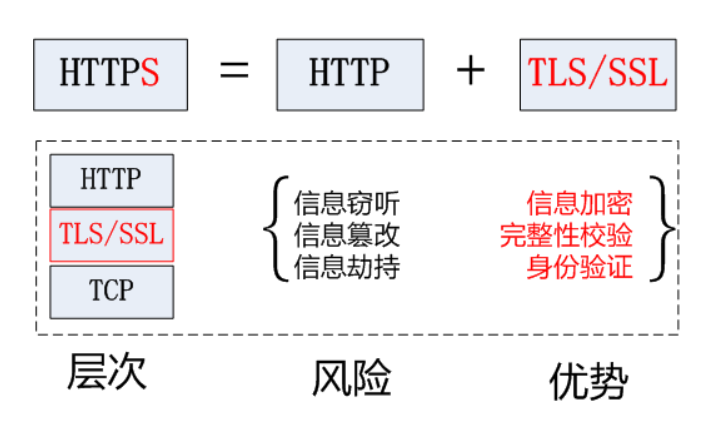
- HTTPS (Secure Hypertext Transfer Protocol) 安全超文本传输协议,是一个安全通信通道,
- 它基于 HTTP开发用于在客户计算机和服务器之间交换信息。
- 它使用安全套接字层(SSL)进行信息交换,简单来说它是HTTP的安全版 ,是使用TLS/SSL加密的 HTTP协议。
- HTTP协议采用明文传输信息,存在信息窃听、信息篡改和信息劫持的风险,而协议 TLS/SSL具有身份验证、信息加密和完整性校验的功能,可以避免此类问题发生。
- SSL(Secure Sockets Layer 安全套接字协议 ),及其继任者传输层安全(Transport Layer Security , TLS)是为网络通信提供安全及数据完整性的一种 安全协议。
- TLS 与SSL在传输层与应用层之间对网 络连接进行加密。
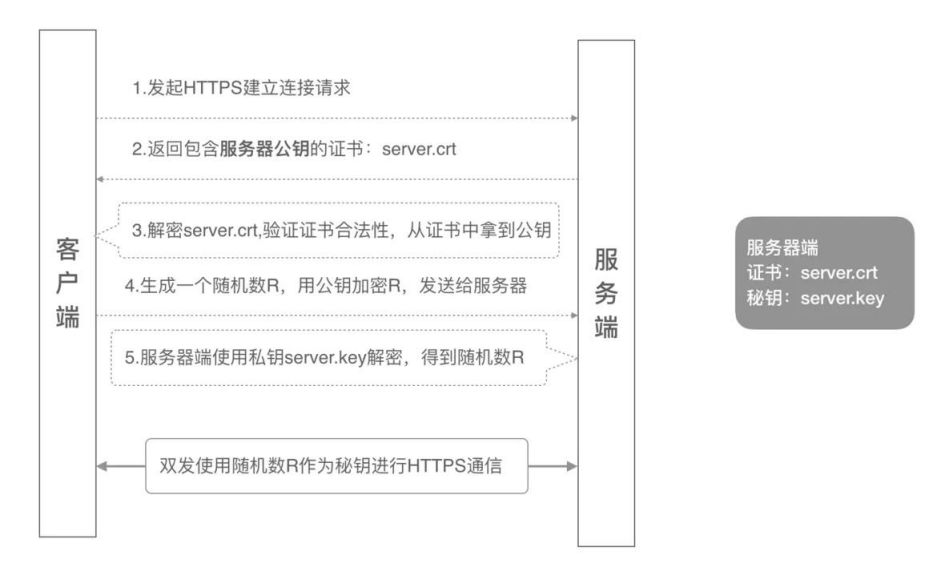
# https单向认证
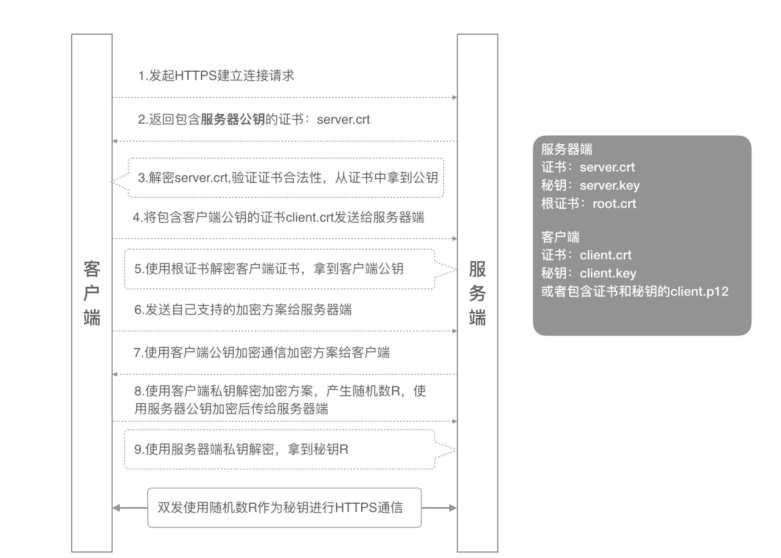
# 双向认证
# keytool
- keytool是jdk自带的一个密钥库管理工具,位于%JAVA_HOME%\bin\keytool.exe,我们可以使用它生成密钥 库、管理证书。
# 生成密钥库
- keytool -genkey -alias tomcat -keyalg RSA -storetype PKCS12 -storepass letmein -keystore mykeys.p12
- 密钥库类型: PKCS12
- 查看密钥库
- keytool -list -keystore mykeys.p12 -storepass letmein
# 密钥库类型: PKCS12
-
格式 : PKCS12,Public Key Cryptography Standards #12
-
扩展名 : .p12/.pfx
-
描述 : 【PKCS #12】个人信息交换语法标准
-
特点 :
- 1、包含私钥、公钥及其证书
- 2、密钥库和私钥用相同密码进行保护
# keytool基本使用
- 生成key和库 keytool -genkey -v -alias key别名 -keyalg RSA -storetype PKCS12 -keystore 库文件名.p12
- 导出证书 keytool -keystore 库文件名.p12 -export -alias key别名 -file 证书文件名.cer
- 打印证书信息 keytool -printcert -file 证书文件名.cer
- 导入证书到库 keytool -import -v -file 证书文件名.cer -keystore 库文件名.p12
配置SSL
server:
	port: 8443
	ssl:
		key-store: classpath:mykeys.p12
		key-store-password: letmein
		key-password: letmein
# 更多参考学习
- https://zhuanlan.zhihu.com/p/400702879
- https://www.cnblogs.com/xq1314/archive/2017/12/05/7987216.html
- https://www.cnblogs.com/simon-xie/p/17004614.html
# 配置日志
-
Spring Boot默认使用Logback,日志配置文件logback.xml
-
默认日志级别:INFO
-
日志配置(application.yml)
logging:
    level:
    root: WARN
		org: Springframework: security: DEBUG
# 自定义配置属性: taco.orders.pageSize属性
- @ConfigurationProperties(prefix=“taco.orders”)
- @Validated
- 通过application.yml文件提供值
- 环境变量:taco_orders_pageSize=12
- 程序参数:–taco.orders.pageSize=13 访问:http://localhost:8080/orders
代码OrderProps
package tacos.web;
import javax.validation.constraints.Max;
import javax.validation.constraints.Min;

import org.springframework.boot.context.properties.
                                        ConfigurationProperties;
import org.springframework.stereotype.Component;
import org.springframework.validation.annotation.Validated;

import lombok.Data;

@Component
@ConfigurationProperties(prefix="taco.orders")
@Data
@Validated
public class OrderProps {

  @Min(value=5, message="must be between 5 and 25")
  @Max(value=25, message="must be between 5 and 25")
  private int pageSize = 20;

}
# 自定义配置属性:taco.discount. codes
Map,对象和数组
访问:http://localhost:8080/discounts
代码
DiscountCodeProps
package tacos;

import java.util.HashMap;
import java.util.Map;

import org.springframework.boot.context.properties.ConfigurationProperties;
import org.springframework.stereotype.Component;

import lombok.Data;

@Component
@ConfigurationProperties(prefix="taco.discount")
@Data
public class DiscountCodeProps {

  private Map<String, Integer> codes = new HashMap<>();

}
DiscountController
package tacos.web;

import java.util.Map;

import org.springframework.stereotype.Controller;
import org.springframework.ui.Model;
import org.springframework.web.bind.annotation.GetMapping;
import org.springframework.web.bind.annotation.RequestMapping;

import tacos.DiscountCodeProps;

@Controller
@RequestMapping("/discounts")
public class DiscountController {

  private DiscountCodeProps discountProps;

  public DiscountController(DiscountCodeProps discountProps) {
    this.discountProps = discountProps;
  }

  @GetMapping
  public String displayDiscountCodes(Model model) {
    Map<String, Integer> codes = discountProps.getCodes();
    model.addAttribute("codes", codes);
    return "discountList";
  }
}
联动见application.yml中的discount
# Spring profile
- 定义特定profile的属性,通过使用不同的YAML或属性文件
- application-{profile名}.properties
- application-{profile名}.yml
- 也可以将不同profile属性放到同一个YAML文件中,使用3个短线进行分隔,并且使用spring.profiles属性来命 名profile
# 激活profile
- 环境变量: spring_profiles_active=prod
- 命令行参数:java -jar ***.jar --spring.profiles.active=prod
- JVM系统属性:java -Dspring.profiles.active=prod -jar ****.jar
- 使用注解@Profile条件化地创建Bean,可以加到@Configuration或@Bean上