# ch05-Spring Data JDBC、JPA
代码仓库:https://github.com/tzs919/taco-cloud-05
# 使用JdbcTemplate简化JDBC访问(spring-boot-starter-jdbc)
# 使用原始的JDBC访问数据库
- RawJdbcIngredientRepository
- 样板式代码(ResultSet、PreparedStatement、Connection)
- SQLException,checked异常
# 异常体系
- SQLException
- 发生异常时很难恢复
- 难确定异常类型
- Hibernate异常
- 定义了许多具体异常,方便定位问题
- 对业务对象的侵入
- Spring所提供的平台无关的持久化异常
- DataAccessException
- 具体异常,方便定位问题
- 隔离具体数据库平台
# 使用JdbcTemplate
添加依赖
<dependency>
    <groupId>org.springframework.boot</groupId>
    <artifactId>spring-boot-starter-jdbc</artifactId>
</dependency>
<dependency>
    <groupId>com.h2database</groupId>
    <artifactId>h2</artifactId>
    <scope>runtime</scope>
</dependency>
# 创建数据库
需要在根路径下提供schema.sql
springboot会自动帮助实例化数据库,创建表
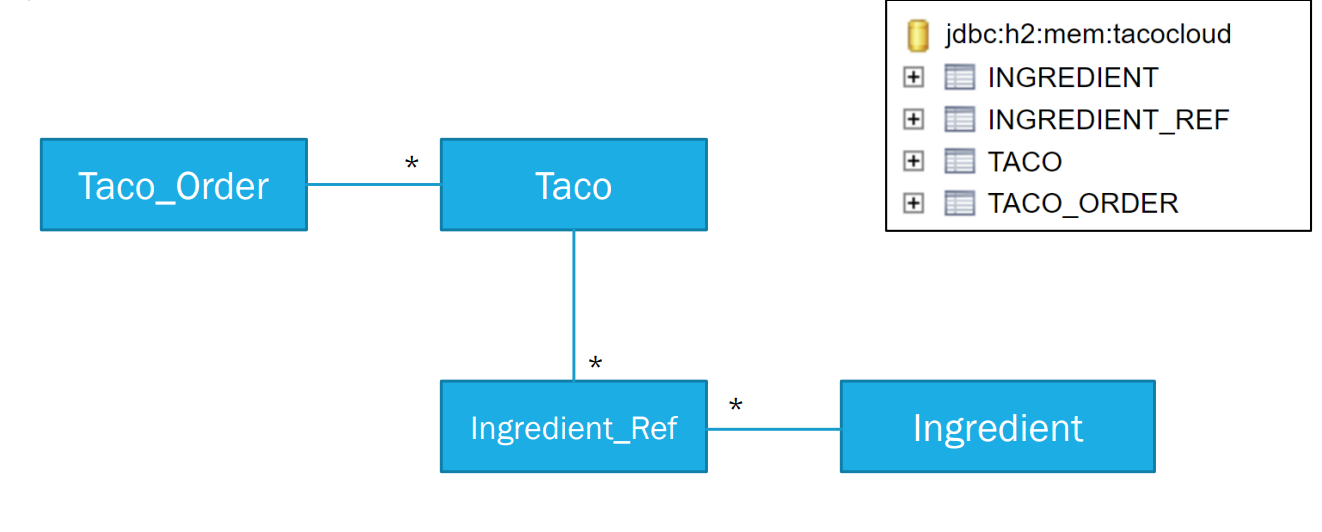
create table if not exists Taco_Order (
  id identity,
  delivery_Name varchar(50) not null,
  delivery_Street varchar(50) not null,
  delivery_City varchar(50) not null,
  delivery_State varchar(20) not null,
  delivery_Zip varchar(10) not null,
  cc_number varchar(19) not null,
  cc_expiration varchar(5) not null,
  cc_cvv varchar(3) not null,
  placed_at timestamp not null
);

create table if not exists Taco (
  id identity,
  name varchar(50) not null,
  taco_order bigint not null,
  taco_order_key bigint not null,
  created_at timestamp not null
);

create table if not exists Ingredient_Ref (
  ingredient varchar(4) not null,
  taco bigint not null,
  taco_key bigint not null
);


create table if not exists Ingredient (
  id varchar(4) not null,
  name varchar(25) not null,
  type varchar(10) not null
);


alter table Taco
    add foreign key (taco_order) references Taco_Order(id);
alter table Ingredient_Ref
    add foreign key (ingredient) references Ingredient(id);
data.sql
紧接着会执行该文件,初始化数据库
delete from Ingredient_Ref;
delete from Taco;
delete from Taco_Order;

delete from Ingredient;
insert into Ingredient (id, name, type)
                values ('FLTO', 'Flour Tortilla', 'WRAP');
insert into Ingredient (id, name, type)
                values ('COTO', 'Corn Tortilla', 'WRAP');
insert into Ingredient (id, name, type)
                values ('GRBF', 'Ground Beef', 'PROTEIN');
insert into Ingredient (id, name, type)
                values ('CARN', 'Carnitas', 'PROTEIN');
insert into Ingredient (id, name, type)
                values ('TMTO', 'Diced Tomatoes', 'VEGGIES');
insert into Ingredient (id, name, type)
                values ('LETC', 'Lettuce', 'VEGGIES');
insert into Ingredient (id, name, type)
                values ('CHED', 'Cheddar', 'CHEESE');
insert into Ingredient (id, name, type)
                values ('JACK', 'Monterrey Jack', 'CHEESE');
insert into Ingredient (id, name, type)
                values ('SLSA', 'Salsa', 'SAUCE');
insert into Ingredient (id, name, type)
                values ('SRCR', 'Sour Cream', 'SAUCE');
提供用户名和密码
application.yml
#tag::setDatabaseName[]
spring:
  datasource:
    generate-unique-name: false
    name: tacocloud
#end::setDatabaseName[]
# 数据库表
# 业务层访问dao层所需要经历的接口
IngredientRepository
package tacos.data;

import java.util.Optional;

import tacos.Ingredient;

public interface IngredientRepository {

  Iterable<Ingredient> findAll();

  Optional<Ingredient> findById(String id);

  Ingredient save(Ingredient ingredient);

}
# spring框架下的实现
# IngredientRepository的实现
- 注入JdbcTemplate,如果只有一个构造方法可以省去@Autowired
- @Repository
- 接口:RowMapper,可以使用lambda表达式
- 注入DesignTacoController,使用
- IngredientByIdConverter实现优化
JdbcIngredientRepository
- @Repository:帮助spring发现这个类,并将其实例化到上下文中
package tacos.data;
import java.sql.ResultSet;
import java.sql.SQLException;
import java.util.List;
import java.util.Optional;

import org.springframework.jdbc.core.JdbcTemplate;
import org.springframework.stereotype.Repository;

import tacos.Ingredient;

@Repository
public class JdbcIngredientRepository implements IngredientRepository {

  private JdbcTemplate jdbcTemplate;

  public JdbcIngredientRepository(JdbcTemplate jdbcTemplate) {
    this.jdbcTemplate = jdbcTemplate;
  }

    //简化后的版本
  @Override
  public Iterable<Ingredient> findAll() {
    return jdbcTemplate.query(
        "select id, name, type from Ingredient",
        this::mapRowToIngredient);
  }

  @Override
  public Optional<Ingredient> findById(String id) {
    List<Ingredient> results = jdbcTemplate.query(
        "select id, name, type from Ingredient where id=?",
        this::mapRowToIngredient,
        id);
    return results.size() == 0 ?
            Optional.empty() :
            Optional.of(results.get(0));
  }

  @Override
  public Ingredient save(Ingredient ingredient) {
    jdbcTemplate.update(
        "insert into Ingredient (id, name, type) values (?, ?, ?)",
        ingredient.getId(),
        ingredient.getName(),
        ingredient.getType().toString());
    return ingredient;
  }

    //针对每一行record,需要转换成java对象
  private Ingredient mapRowToIngredient(ResultSet row, int rowNum)
      throws SQLException {
    return new Ingredient(
        row.getString("id"),
        row.getString("name"),
        Ingredient.Type.valueOf(row.getString("type")));
  }

  /*
  @Override
  public Ingredient findById(String id) {
    return jdbcTemplate.queryForObject(
        "select id, name, type from Ingredient where id=?",
        new RowMapper<Ingredient>() {
          public Ingredient mapRow(ResultSet rs, int rowNum)
              throws SQLException {
            return new Ingredient(
                rs.getString("id"),
                rs.getString("name"),
                Ingredient.Type.valueOf(rs.getString("type")));
          };
        }, id);
  }
   */
}
# JdbcOrderRepository核心代码
save(TacoOrder order)的实现
- Taco不能脱离TacoOrder而存在,聚合关系
- JdbcOrderRepository
- identity字段由数据库自动生成值,获取返回的ID,GeneratedKeyHolder
- PreparedStatementCreatorFactory
- PreparedStatementCreator
- jdbcOperations.update
- 注入OrderController,使用
package tacos.data;

import java.sql.Types;
import java.util.Arrays;
import java.util.Date;
import java.util.List;
import java.util.Optional;

import org.springframework.asm.Type;
import org.springframework.dao.IncorrectResultSizeDataAccessException;
import org.springframework.jdbc.core.JdbcOperations;
import org.springframework.jdbc.core.PreparedStatementCreator;
import org.springframework.jdbc.core.PreparedStatementCreatorFactory;
import org.springframework.jdbc.support.GeneratedKeyHolder;
import org.springframework.stereotype.Repository;
import org.springframework.transaction.annotation.Transactional;

import tacos.IngredientRef;
import tacos.Taco;
import tacos.TacoOrder;

@Repository
public class JdbcOrderRepository implements OrderRepository {

  private JdbcOperations jdbcOperations;

  public JdbcOrderRepository(JdbcOperations jdbcOperations) {
    this.jdbcOperations = jdbcOperations;
  }

  @Override
  @Transactional
  public TacoOrder save(TacoOrder order) {
      //创建工厂对象,需要提供sql语句以及参数对应的类型
    PreparedStatementCreatorFactory pscf =
      new PreparedStatementCreatorFactory(
        "insert into Taco_Order "
        + "(delivery_name, delivery_street, delivery_city, "
        + "delivery_state, delivery_zip, cc_number, "
        + "cc_expiration, cc_cvv, placed_at) "
        + "values (?,?,?,?,?,?,?,?,?)",
        Types.VARCHAR, Types.VARCHAR, Types.VARCHAR,
        Types.VARCHAR, Types.VARCHAR, Types.VARCHAR,
        Types.VARCHAR, Types.VARCHAR, Types.TIMESTAMP
    );
    pscf.setReturnGeneratedKeys(true);

    order.setPlacedAt(new Date());
      //创建creator对象,基于工厂调用方法
    PreparedStatementCreator psc =
        pscf.newPreparedStatementCreator(
            Arrays.asList(
                order.getDeliveryName(),
                order.getDeliveryStreet(),
                order.getDeliveryCity(),
                order.getDeliveryState(),
                order.getDeliveryZip(),
                order.getCcNumber(),
                order.getCcExpiration(),
                order.getCcCVV(),
                order.getPlacedAt()));

    GeneratedKeyHolder keyHolder = new GeneratedKeyHolder();
      //使数据库新增一条记录
    jdbcOperations.update(psc, keyHolder);
      //获得新增记录的id
    long orderId = keyHolder.getKey().longValue();
      //将id值赋值给order
    order.setId(orderId);

    List<Taco> tacos = order.getTacos();
    int i=0;
    for (Taco taco : tacos) {
      saveTaco(orderId, i++, taco);
    }

    return order;
  }

  private long saveTaco(Long orderId, int orderKey, Taco taco) {
    taco.setCreatedAt(new Date());
    PreparedStatementCreatorFactory pscf =
            new PreparedStatementCreatorFactory(
        "insert into Taco "
        + "(name, created_at, taco_order, taco_order_key) "
        + "values (?, ?, ?, ?)",
        Types.VARCHAR, Types.TIMESTAMP, Type.LONG, Type.LONG
    );
    pscf.setReturnGeneratedKeys(true);

    PreparedStatementCreator psc =
        pscf.newPreparedStatementCreator(
            Arrays.asList(
                taco.getName(),
                taco.getCreatedAt(),
                orderId,
                orderKey));

    GeneratedKeyHolder keyHolder = new GeneratedKeyHolder();
    jdbcOperations.update(psc, keyHolder);
    long tacoId = keyHolder.getKey().longValue();
    taco.setId(tacoId);

    saveIngredientRefs(tacoId, taco.getIngredients());

    return tacoId;
  }

  private void saveIngredientRefs(
      long tacoId, List<IngredientRef> ingredientRefs) {
    int key = 0;
    for (IngredientRef ingredientRef : ingredientRefs) {
      jdbcOperations.update(
          "insert into Ingredient_Ref (ingredient, taco, taco_key) "
          + "values (?, ?, ?)",
          ingredientRef.getIngredient(), tacoId, key++);
    }
  }

  @Override
  public Optional<TacoOrder> findById(Long id) {
    try {
      TacoOrder order = jdbcOperations.queryForObject(
          "select id, delivery_name, delivery_street, delivery_city, "
              + "delivery_state, delivery_zip, cc_number, cc_expiration, "
              + "cc_cvv, placed_at from Taco_Order where id=?",
          (row, rowNum) -> {
            TacoOrder tacoOrder = new TacoOrder();
            tacoOrder.setId(row.getLong("id"));
            tacoOrder.setDeliveryName(row.getString("delivery_name"));
            tacoOrder.setDeliveryStreet(row.getString("delivery_street"));
            tacoOrder.setDeliveryCity(row.getString("delivery_city"));
            tacoOrder.setDeliveryState(row.getString("delivery_state"));
            tacoOrder.setDeliveryZip(row.getString("delivery_zip"));
            tacoOrder.setCcNumber(row.getString("cc_number"));
            tacoOrder.setCcExpiration(row.getString("cc_expiration"));
            tacoOrder.setCcCVV(row.getString("cc_cvv"));
            tacoOrder.setPlacedAt(new Date(row.getTimestamp("placed_at").getTime()));
            tacoOrder.setTacos(findTacosByOrderId(row.getLong("id")));
            return tacoOrder;
          }, id);
      return Optional.of(order);
    } catch (IncorrectResultSizeDataAccessException e) {
      return Optional.empty();
    }
  }

  private List<Taco> findTacosByOrderId(long orderId) {
    return jdbcOperations.query(
        "select id, name, created_at from Taco "
        + "where taco_order=? order by taco_order_key",
        (row, rowNum) -> {
          Taco taco = new Taco();
          taco.setId(row.getLong("id"));
          taco.setName(row.getString("name"));
          taco.setCreatedAt(new Date(row.getTimestamp("created_at").getTime()));
          taco.setIngredients(findIngredientsByTacoId(row.getLong("id")));
          return taco;
        },
        orderId);
  }

  private List<IngredientRef> findIngredientsByTacoId(long tacoId) {
    return jdbcOperations.query(
        "select ingredient from Ingredient_Ref "
        + "where taco = ? order by taco_key",
        (row, rowNum) -> {
          return new IngredientRef(row.getString("ingredient"));
        },
        tacoId);
  }
}
JDBC的方式:RawJdbcIngredientRepository
核心、模板化的、最原始的
package tacos.data;

import java.sql.Connection;
import java.sql.PreparedStatement;
import java.sql.ResultSet;
import java.sql.SQLException;
import java.util.ArrayList;
import java.util.List;
import java.util.Optional;

import javax.sql.DataSource;

import org.springframework.jdbc.core.JdbcTemplate;

import tacos.Ingredient;

/**
 * Raw implementation of {@link IngredientRepository} for
 * comparison with {@link JdbcIngredientRepository} to illustrate
 * the power of using {@link JdbcTemplate}.
 * @author habuma
 */
public class RawJdbcIngredientRepository implements IngredientRepository {

  private DataSource dataSource;

  public RawJdbcIngredientRepository(DataSource dataSource) {
    this.dataSource = dataSource;
  }

  @Override
  public Iterable<Ingredient> findAll() {
    List<Ingredient> ingredients = new ArrayList<>();
    Connection connection = null;
    PreparedStatement statement = null;
    ResultSet resultSet = null;
    try {
        //先建立连接
      connection = dataSource.getConnection();
        //创建statement:查询语句
      statement = connection.prepareStatement(
          "select id, name, type from Ingredient");
        //执行所定义的查询
      resultSet = statement.executeQuery();
        //将查询的结果转化为所需要的java对象
      while(resultSet.next()) {
        Ingredient ingredient = new Ingredient(
            resultSet.getString("id"),
            resultSet.getString("name"),
            Ingredient.Type.valueOf(resultSet.getString("type")));
        ingredients.add(ingredient);
      }
    } catch (SQLException e) {
      // ??? What should be done here ???
    } finally {
        //及时关闭连接
      if (resultSet != null) {
        try {
          resultSet.close();
        } catch (SQLException e) {}
      }
      if (statement != null) {
        try {
          statement.close();
        } catch (SQLException e) {}
      }
      if (connection != null) {
        try {
          connection.close();
        } catch (SQLException e) {}
      }
    }
    return ingredients;
  }

  @Override
  public Optional<Ingredient> findById(String id) {
    Connection connection = null;
    PreparedStatement statement = null;
    ResultSet resultSet = null;
    try {
      connection = dataSource.getConnection();
      statement = connection.prepareStatement(
          "select id, name, type from Ingredient where id=?");
      statement.setString(1, id);
      resultSet = statement.executeQuery();
      Ingredient ingredient = null;
      if(resultSet.next()) {
        ingredient = new Ingredient(
            resultSet.getString("id"),
            resultSet.getString("name"),
            Ingredient.Type.valueOf(resultSet.getString("type")));
      }
      return Optional.of(ingredient);
    } catch (SQLException e) {
      // ??? What should be done here ???
    } finally {
      if (resultSet != null) {
        try {
          resultSet.close();
        } catch (SQLException e) {}
      }
      if (statement != null) {
        try {
          statement.close();
        } catch (SQLException e) {}
      }
      if (connection != null) {
        try {
          connection.close();
        } catch (SQLException e) {}
      }
    }
    return Optional.empty();
  }

  @Override
  public Ingredient save(Ingredient ingredient) {
    // TODO: I only needed one method for comparison purposes, so
    //       I've not bothered implementing this one (yet).
    return null;
  }
}
# 业务层实现
# controller
DesignTacoController
package tacos.web;

import java.util.stream.Collectors;
import java.util.stream.StreamSupport;

import javax.validation.Valid;

import org.springframework.beans.factory.annotation.Autowired;
import org.springframework.stereotype.Controller;
import org.springframework.ui.Model;
import org.springframework.validation.Errors;
import org.springframework.web.bind.annotation.GetMapping;
import org.springframework.web.bind.annotation.ModelAttribute;
import org.springframework.web.bind.annotation.PostMapping;
import org.springframework.web.bind.annotation.RequestMapping;
import org.springframework.web.bind.annotation.SessionAttributes;

import tacos.Ingredient;
import tacos.Ingredient.Type;
import tacos.TacoOrder;
import tacos.Taco;
import tacos.data.IngredientRepository;

@Controller
@RequestMapping("/design")
@SessionAttributes("tacoOrder")
public class DesignTacoController {

  private final IngredientRepository ingredientRepo;

  @Autowired
  public DesignTacoController(
        IngredientRepository ingredientRepo) {
    this.ingredientRepo = ingredientRepo;
  }

  @ModelAttribute
  public void addIngredientsToModel(Model model) {
    Iterable<Ingredient> ingredients = ingredientRepo.findAll();
    Type[] types = Ingredient.Type.values();
    for (Type type : types) {
      model.addAttribute(type.toString().toLowerCase(),
          filterByType(ingredients, type));
    }
  }

  @ModelAttribute(name = "tacoOrder")
  public TacoOrder order() {
    return new TacoOrder();
  }

  @ModelAttribute(name = "taco")
  public Taco taco() {
    return new Taco();
  }

  @GetMapping
  public String showDesignForm() {
    return "design";
  }

  @PostMapping
  public String processTaco(
      @Valid Taco taco, Errors errors,
      @ModelAttribute TacoOrder tacoOrder) {

    if (errors.hasErrors()) {
      return "design";
    }

    tacoOrder.addTaco(taco);

    return "redirect:/orders/current";
  }

  private Iterable<Ingredient> filterByType(
      Iterable<Ingredient> ingredients, Type type) {
    return StreamSupport.stream(ingredients.spliterator(), false)
              .filter(i -> i.getType().equals(type))
              .collect(Collectors.toList());
  }
}
OrderController
package tacos.web;
import javax.validation.Valid;

import org.springframework.stereotype.Controller;
import org.springframework.validation.Errors;
import org.springframework.web.bind.annotation.GetMapping;
import org.springframework.web.bind.annotation.PostMapping;
import org.springframework.web.bind.annotation.RequestMapping;
import org.springframework.web.bind.annotation.SessionAttributes;
import org.springframework.web.bind.support.SessionStatus;

import tacos.TacoOrder;
import tacos.data.OrderRepository;

@Controller
@RequestMapping("/orders")
@SessionAttributes("tacoOrder")
public class OrderController {

  private OrderRepository orderRepo;

  public OrderController(OrderRepository orderRepo) {
    this.orderRepo = orderRepo;
  }

  @GetMapping("/current")
  public String orderForm() {
    return "orderForm";
  }

  @PostMapping
  public String processOrder(@Valid TacoOrder order, Errors errors, SessionStatus sessionStatus) {
    if (errors.hasErrors()) {
      return "orderForm";
    }

    orderRepo.save(order);
    sessionStatus.setComplete();

    return "redirect:/";
  }
}
附带tacoOrder类
package tacos;
import java.io.Serializable;
import java.util.ArrayList;
import java.util.Date;
import java.util.List;

import javax.validation.constraints.Digits;
import javax.validation.constraints.NotBlank;
import javax.validation.constraints.Pattern;

import org.hibernate.validator.constraints.CreditCardNumber;

import lombok.Data;

@Data
public class TacoOrder implements Serializable {

  private static final long serialVersionUID = 1L;

  private Long id;

  private Date placedAt;


  @NotBlank(message="Delivery name is required")
  private String deliveryName;

  @NotBlank(message="Street is required")
  private String deliveryStreet;

  @NotBlank(message="City is required")
  private String deliveryCity;

  @NotBlank(message="State is required")
  private String deliveryState;

  @NotBlank(message="Zip code is required")
  private String deliveryZip;

  @CreditCardNumber(message="Not a valid credit card number")
  private String ccNumber;

  @Pattern(regexp="^(0[1-9]|1[0-2])([\\/])([2-9][0-9])$",
           message="Must be formatted MM/YY")
  private String ccExpiration;

  @Digits(integer=3, fraction=0, message="Invalid CVV")
  private String ccCVV;

  private List<Taco> tacos = new ArrayList<>();

  public void addTaco(Taco taco) {
    this.tacos.add(taco);
  }
}
附带taco类
package tacos;
import java.util.ArrayList;
import java.util.Date;
import java.util.List;

import javax.validation.constraints.NotNull;
import javax.validation.constraints.Size;

import lombok.Data;

@Data
public class Taco {

  private Long id;

  private Date createdAt = new Date();

  @NotNull
  @Size(min=5, message="Name must be at least 5 characters long")
  private String name;

  @Size(min=1, message="You must choose at least 1 ingredient")
  private List<IngredientRef> ingredients = new ArrayList<>();

  public void addIngredient(Ingredient taco) {
    this.ingredients.add(new IngredientRef(taco.getId()));
  }
}
IngredientRef:用配料的id唯一标识引用一个配料
package tacos;

import lombok.Data;

@Data
public class IngredientRef {
  private final String ingredient;
}
# 转化客户端的字符串为ingredient的对象
IngredientByIdConverter
控制器层无需知道repo的具体实现,只需要知道接口就好
@Component && @Autowired:自动注入的方式
package tacos.web;

import org.springframework.beans.factory.annotation.Autowired;
import org.springframework.core.convert.converter.Converter;
import org.springframework.stereotype.Component;

import tacos.Ingredient;
import tacos.data.IngredientRepository;

@Component
public class IngredientByIdConverter implements Converter<String, Ingredient> {

  private IngredientRepository ingredientRepo;

  @Autowired
  public IngredientByIdConverter(IngredientRepository ingredientRepo) {
    this.ingredientRepo = ingredientRepo;
  }

  @Override
  public Ingredient convert(String id) {
    return ingredientRepo.findById(id).orElse(null);
  }
}
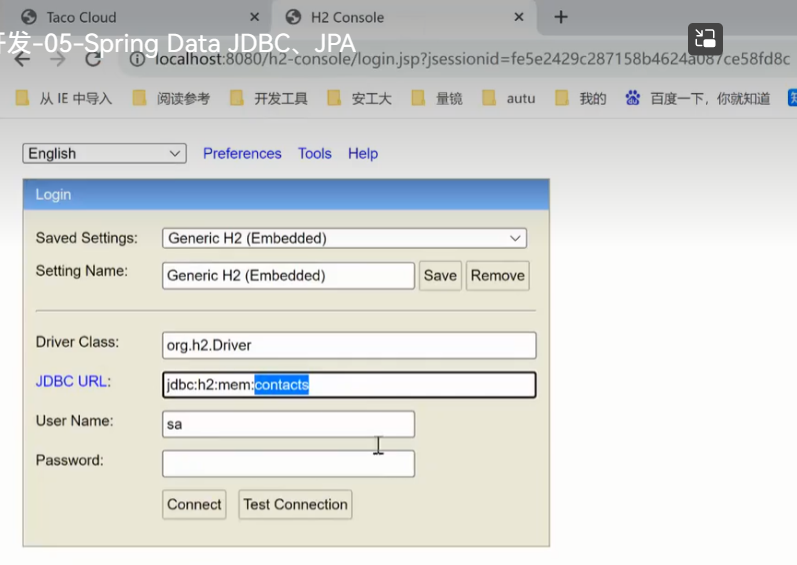
# H2访问
- http://localhost:8080/h2-console
- 驱动:org.h2.Driver
- JDBC URL:jdbc:h2:mem:tacocloud
- 用户名:sa
# Spring Data项目
属于Spring Data项目,和上面的JDBC不一样。进一步简化,只需要提供接口。
# 异同
- 异
- 只定义了一个接口
CrudRepository
- 同
- 需要自己创建表(scheme.sql脚本定义表结构),data.sql初始化数据
- Spring Data JDBC
- Spring Data JPA
- Spring Data MongoDB
- Spring Data Neo4j
- Spring Data Redis
- Spring Data Cassandr
# Spring Data JDBC
添加依赖
<dependency>
    <groupId>org.springframework.boot</groupId>
    <artifactId>spring-boot-starter-data-jdbc</artifactId>
</dependency>
# 步骤
- 添加依赖
- 定义存储库接口
- 为领域类添加持久化注解
# 存储库接口
- Spring Data会在运行时自动生成存储库接口的实现。但是,只有当接口扩展自Spring Data提供的存储库接口时,它才会帮我们实现这一点。
- Repository接口是参数化的,其中第一个参数是该存储库要持久化的对象类型;第二个参数是要持久化对象的ID字段的类型。
public interface IngredientRepository extends Repository<Ingredient, String> {
  Iterable<Ingredient> findAll();

  Optional<Ingredient> findById(String id);

  Ingredient save(Ingredient ingredient);
}
public interface IngredientRepository extends CrudRepository<Ingredient, String> {
}
CrudRepository接口包含了增删改查等基础操作 当应用启动的时候,Spring Data会在运行时自动生成一个实现。这意味着存储库已经准备就绪,我们将其注入控制器就可以了。
# 实现
详细解释不同之处:只需要一个接口不需要实现,拓展自CrudRepository
IngredientRepository
package tacos.data;

import org.springframework.data.repository.CrudRepository;

import tacos.Ingredient;

public interface IngredientRepository
         extends CrudRepository<Ingredient, String> {
}
crud:增删改查
这样写spring会自动实现增删改查
需要额外告诉spring一些信息:java对象与数据库中的表的对应关系,如果名字一样可以省略注解
Ingredient
package tacos;

import org.springframework.data.annotation.Id;
import org.springframework.data.domain.Persistable;
import org.springframework.data.relational.core.mapping.Table;

import lombok.AccessLevel;
import lombok.AllArgsConstructor;
import lombok.Data;
import lombok.NoArgsConstructor;

@Data
@Table
@AllArgsConstructor
@NoArgsConstructor(access=AccessLevel.PRIVATE, force=true)
public class Ingredient implements Persistable<String> {

  @Id
  private String id;

  private String name;
  private Type type;

  @Override
	public boolean isNew() {
		return true;
	}

  public enum Type {
    WRAP, PROTEIN, VEGGIES, CHEESE, SAUCE
  }
}
OrderRepository
package tacos.data;

import org.springframework.data.repository.CrudRepository;

import tacos.TacoOrder;

public interface OrderRepository
         extends CrudRepository<TacoOrder, Long> {

}
# 为领域类添加持久化的注解
- @Table,对象会基于领域类的名称映射到数据库的表上
- TacoOrder会映射到Taco_Order表
- @Id
- @Column
- deliveryName会映射到delivery_Name列
# 程序预加载
- org.springframework.boot.CommandLineRunner
- org.springframework.boot.ApplicationRunner
TacoCloudApplication
package tacos;

import org.springframework.boot.CommandLineRunner;
import org.springframework.boot.SpringApplication;
import org.springframework.boot.autoconfigure.SpringBootApplication;
import org.springframework.context.annotation.Bean;

import tacos.Ingredient.Type;
import tacos.data.IngredientRepository;

@SpringBootApplication
public class TacoCloudApplication {

  public static void main(String[] args) {
    SpringApplication.run(TacoCloudApplication.class, args);
  }

  @Bean
  public CommandLineRunner dataLoader(IngredientRepository repo) {
    return args -> {
      repo.deleteAll(); // TODO: Quick hack to avoid tests from stepping on each other with constraint violations
      repo.save(new Ingredient("FLTO", "Flour Tortilla", Type.WRAP));
      repo.save(new Ingredient("COTO", "Corn Tortilla", Type.WRAP));
      repo.save(new Ingredient("GRBF", "Ground Beef", Type.PROTEIN));
      repo.save(new Ingredient("CARN", "Carnitas", Type.PROTEIN));
      repo.save(new Ingredient("TMTO", "Diced Tomatoes", Type.VEGGIES));
      repo.save(new Ingredient("LETC", "Lettuce", Type.VEGGIES));
      repo.save(new Ingredient("CHED", "Cheddar", Type.CHEESE));
      repo.save(new Ingredient("JACK", "Monterrey Jack", Type.CHEESE));
      repo.save(new Ingredient("SLSA", "Salsa", Type.SAUCE));
      repo.save(new Ingredient("SRCR", "Sour Cream", Type.SAUCE));
    };
  }
}
# Spring Data JPA
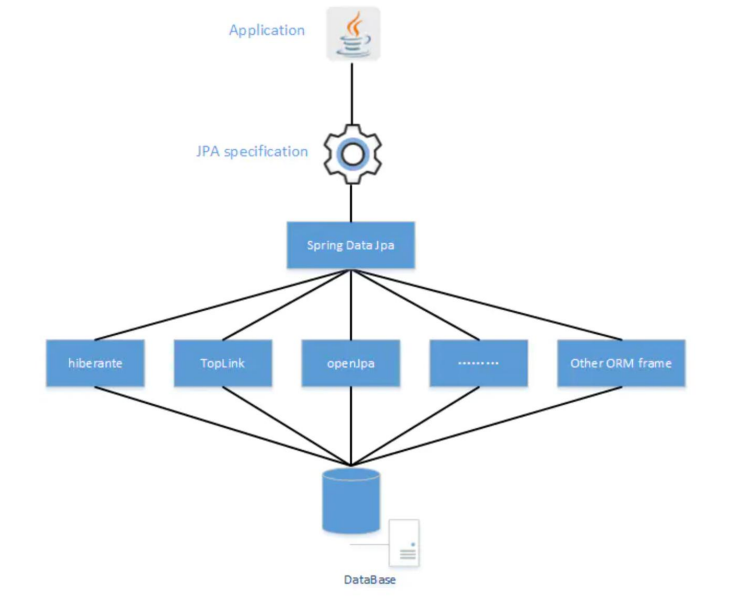
- JPA:Java Persistence API
- JPA的宗旨是为POJO提供持久化标准规范
- JPQL是一种面向对象的查询语言
- 依赖
<dependency>
    <groupId>org.springframework.boot</groupId>
    <artifactId>spring-boot-starter-data-jpa</artifactId>
</dependency>
# 实现
- 添加依赖
- 定义接口:接口跟spring data jdbc一致,业务层和控制器层无需修改
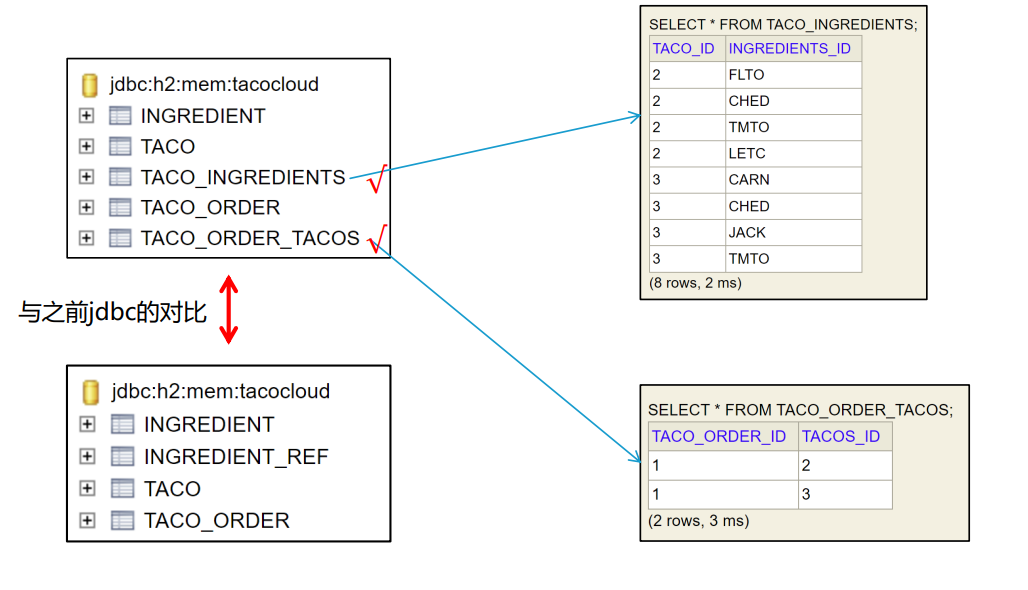
- 在实体类中指定对应关系,打上**@Entity**,见Ingredient, scheme.sql不用手写,根据java对象的定义自动生成表结构
- id属性需要使用@Id注解,以便于将其指定为数据库中唯一标识该实体的属性
@GeneratedValue(strategy = GenerationType.AUTO)- 依赖数据库自动生成ID值
package tacos;

import javax.persistence.Entity;
import javax.persistence.Id;

import lombok.AccessLevel;
import lombok.AllArgsConstructor;
import lombok.Data;
import lombok.NoArgsConstructor;

@Data
@Entity
@AllArgsConstructor
@NoArgsConstructor(access=AccessLevel.PRIVATE, force=true)
public class Ingredient {

  @Id
  private String id;
  private String name;
  private Type type;

  public enum Type {
    WRAP, PROTEIN, VEGGIES, CHEESE, SAUCE
  }
}
taco
@ManyToMany():多对多,表与taco多对多
package tacos;
import java.util.ArrayList;
import java.util.Date;
import java.util.List;

import javax.persistence.Entity;
import javax.persistence.GeneratedValue;
import javax.persistence.GenerationType;
import javax.persistence.Id;
import javax.persistence.ManyToMany;
import javax.validation.constraints.NotNull;
import javax.validation.constraints.Size;

import lombok.Data;

@Data
@Entity
public class Taco {

  @Id
  @GeneratedValue(strategy = GenerationType.AUTO)
  private Long id;

  @NotNull
  @Size(min=5, message="Name must be at least 5 characters long")
  private String name;

  private Date createdAt = new Date();

  @Size(min=1, message="You must choose at least 1 ingredient")
  @ManyToMany()
  private List<Ingredient> ingredients = new ArrayList<>();

  public void addIngredient(Ingredient ingredient) {
    this.ingredients.add(ingredient);
  }
}
tacoOrder
@OneToMany(cascade = CascadeType.ALL)一对多
all是级联,tacoOrder不存在,taco也不存在
package tacos;
import java.io.Serializable;
import java.util.ArrayList;
import java.util.Date;
import java.util.List;

import javax.persistence.CascadeType;
import javax.persistence.Entity;
import javax.persistence.GeneratedValue;
import javax.persistence.GenerationType;
import javax.persistence.Id;
import javax.persistence.OneToMany;
import javax.validation.constraints.Digits;
import javax.validation.constraints.NotBlank;
import javax.validation.constraints.Pattern;

import org.hibernate.validator.constraints.CreditCardNumber;

import lombok.Data;

@Data
@Entity
public class TacoOrder implements Serializable {

  private static final long serialVersionUID = 1L;

  @Id
  @GeneratedValue(strategy = GenerationType.AUTO)
  private Long id;

  private Date placedAt = new Date();

  @NotBlank(message="Delivery name is required")
  private String deliveryName;

  @NotBlank(message="Street is required")
  private String deliveryStreet;

  @NotBlank(message="City is required")
  private String deliveryCity;

  @NotBlank(message="State is required")
  private String deliveryState;

  @NotBlank(message="Zip code is required")
  private String deliveryZip;

  @CreditCardNumber(message="Not a valid credit card number")
  private String ccNumber;

  @Pattern(regexp="^(0[1-9]|1[0-2])([\\/])([2-9][0-9])$",
           message="Must be formatted MM/YY")
  private String ccExpiration;

  @Digits(integer=3, fraction=0, message="Invalid CVV")
  private String ccCVV;

  @OneToMany(cascade = CascadeType.ALL)
  private List<Taco> tacos = new ArrayList<>();

  public void addTaco(Taco taco) {
    this.tacos.add(taco);
  }
}
# 自定义JPA存储库
# DSL
- Spring Data定义了一组小型的领域特定语言(Domain-Specific Language,DSL),在这里,持久化的细节都是通过存储库方法的签名来描述的。
- 存储库的方法由一个动词、一个可选的主题(subject)、关键词By,以及一个断言组成。
- 常用动词:get、read、find、count
- 例子:
List<TacoOrder> findByDeliveryZip(String deliveryZip);
在findByDeliveryZip()这个样例中,动词是find,断言是DeliveryZip,主题并没有指定,暗含的主题是TacoOrder。
# JPQL
-
@Query- 在查询语句中写SQL语句
@Query("Order o where o.deliveryCity = 'Seattle'")
List<TacoOrder> readOrdersDeliveredInSeattle();
- 同样适用于Spring DataJDBC,但存在以下差异
- 在@Query中声明的必须全部是SQL查询,不允许使用JPA查询
- 所有的自定义方法都需要使用@Query。这是因为,与JPA不同,我们没有映射元数据帮助Spring Data JDBC根据方法名自动推断查询。
# 数据访问对象模拟
常用工具Mockito
-
业务层依赖接口
(依赖倒置)
- 接口实现可以替换不需要修改业务层
- 方便测试
# 三种方法区别、相同点👍
- 数据表生成:1、2需要scheme脚本,3不需要(根据领域类自动生成)
- 数据库访问层:1需要自己实现接口,2、3不需要
- 领域类注解:1不需要为领域类加注解,2、3要为领域类加注解(提供领域类和表结构的映射关系)
- 2: @Id
- 3: @Entity, @Id
- 自定义查询:2、3都可以使用@Querry定义查询逻辑,但3还可以使用基于方法名的DSL自定义查询
- ID字段的处理:1需要手动获取数据库生成的Id,2、3不需要
- 存储库接口:2、3都继承自CrudRepository接口
- 包路径:2、3为领域类添加持久化的注解包路径不一样
- JPA中的规范注解都来自javax.persisitence.* ,因为不是Spring自己实现
- @Table,对象会基于领域类的名称映射到数据库的表上
- @Id
- 有两个来自不同包的@Id,主义区别
- @Column
# Jpa、Hibernate、Spring Data Jpa三者之间的关系
# 自动生成的数据库表
# 定义的查询方法
- 定义查询方法,无需实现
- 领域特定语言(domain-specific language,DSL),spring data的命名约定
- 查询动词 + 主题 + 断言
- 查询动词:get、read、find、count
- 例子: List findByDeliveryZip( String deliveryZip );
- 声明自定义查询
- 不符合方法命名约定时,或者命名太长时
- @Query(“Order o where o.deliveryCity = ‘Seattle’”) List readOrdersDeliveredInSeattle( );