# ch09-Rest API开发
# config
# 使用Spring MVC的控制器创建RESTful端点
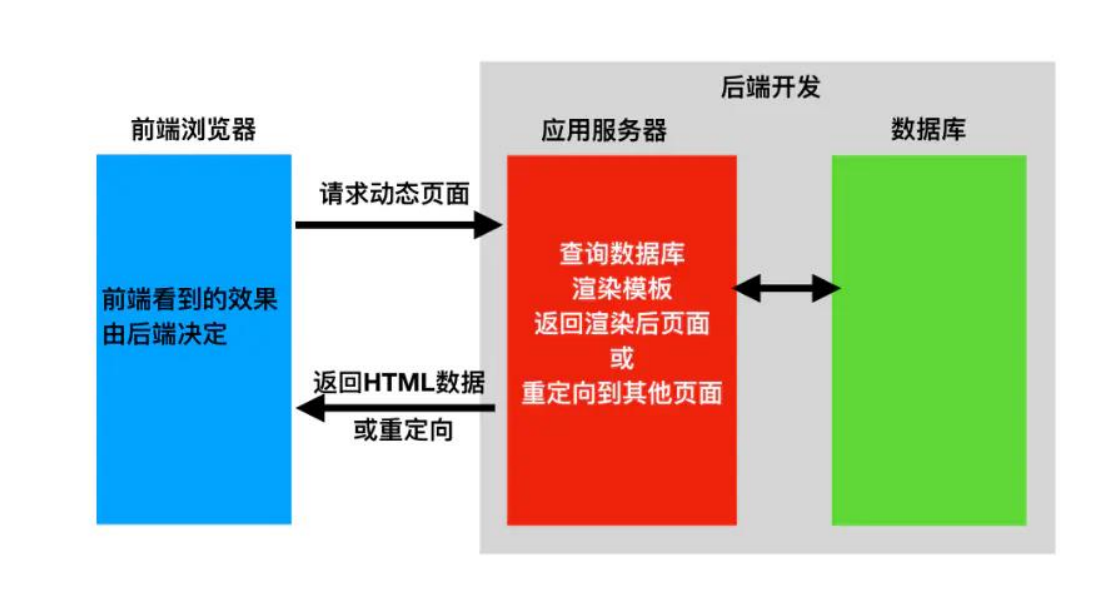
# 前、后端不分离的开发模式
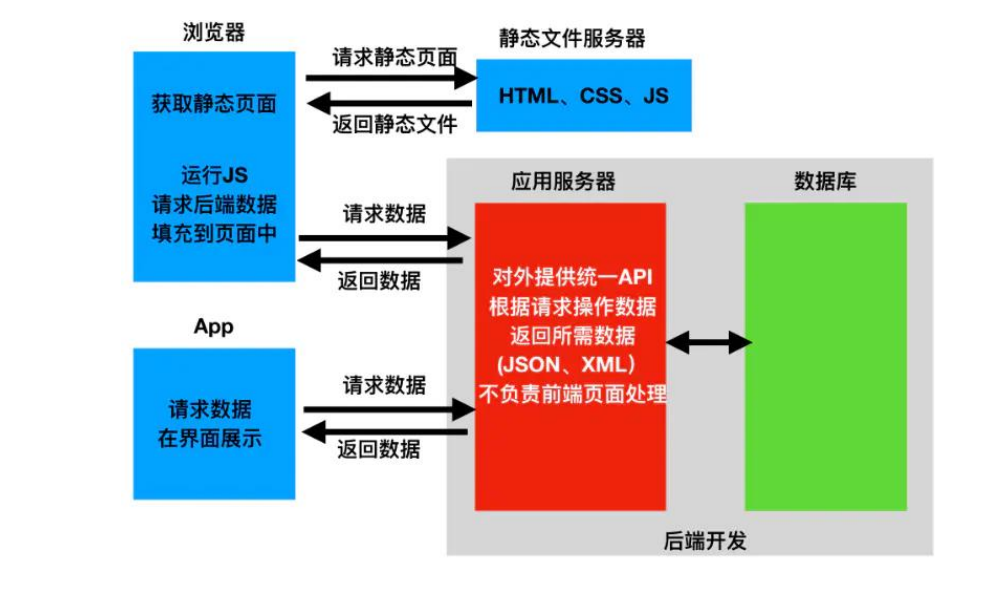
# 前、后端分离的开发模式
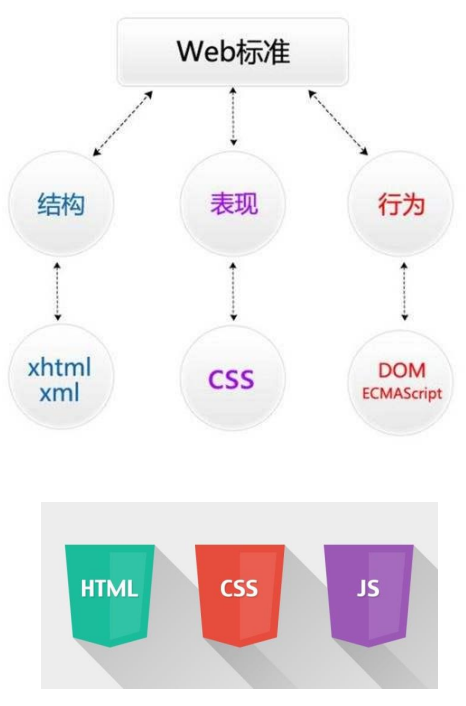
# 前端开发的基础
- HTML、CSS 和 JavaScript
- Node.js,是一个Javascript运行环境。它让 Javascript可以开发后端程序,实现几乎其他后端语言实现的所有功能
- NPM,全称是Node Package Manager, https://www.npmjs.com/,是一个NodeJS包管 理和分发工具,已经成为了非官方的发布Node模 块(包)的标准
# 前端开发框架:Vue.js
- 官网: https://v3.cn.vuejs.org/
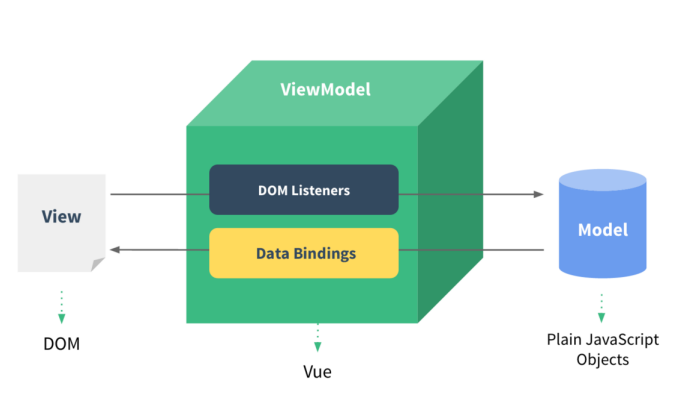
- Vue.js是一款流行的JavaScript前端框架,旨在更 好地组织与简化Web开发
- Vue所关注的核心是MVC模式中的视图层,同时, 它也能方便地获取数据更新,并通过组件内部特 定的方法实现视图与模型的交互
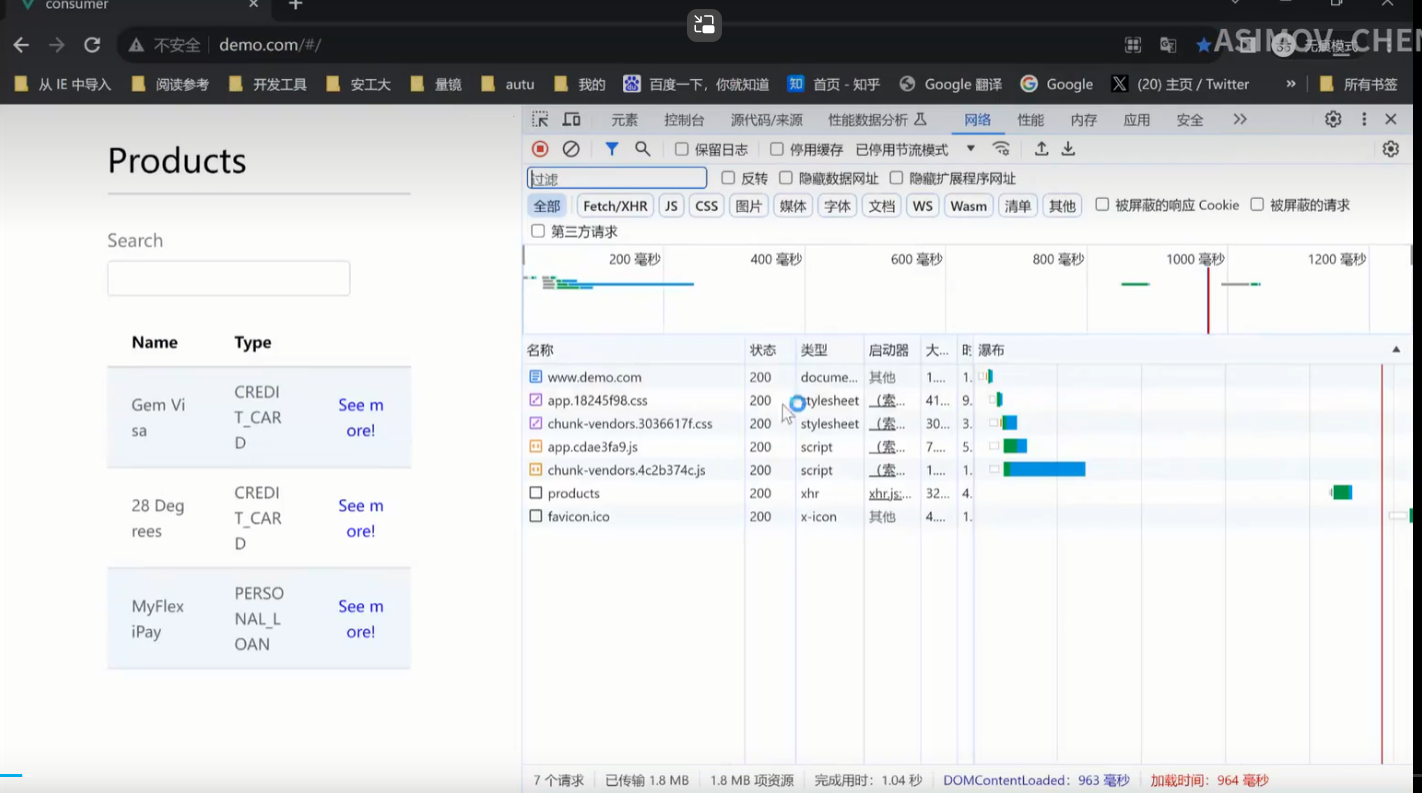
# 一个前、后端开发的例子

# 部署图
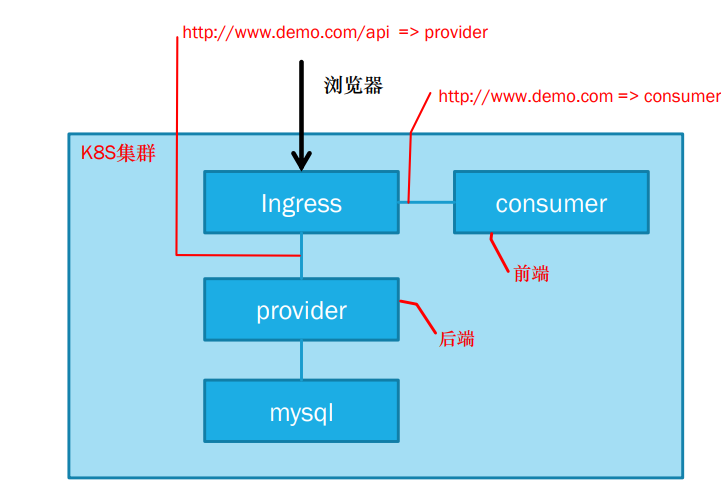
- ingress:网关,做请求的分离和权限的控制,不想暴露所有端口
# curl工具
- curl 是常用的命令行工具,用来请求 Web 服务器。它的名字就是客户端(client)的 URL 工具的意思。
- 它的 功能非常强大,命令行参数多达几十种。如果熟练的话,完全可以取代 Postman 这一类的图形界面工具
- 安装:https://curl.se/download.html
# Rest原则
- Representational State Transfer,表现层状态转移
- 资源(Resources),就是网络上的一个实体,标识:URI
- 表现层(Representation):json、xml、html、pdf、excel
- 状态转移(State Transfer):服务端–客户端
- HTTP协议的四个操作方式的动词:GET、POST、PUT、DELETE ➢ CRUD:Create、Read、Update、Delete
- 如果一个架构符合REST原则,就称它为RESTful架构
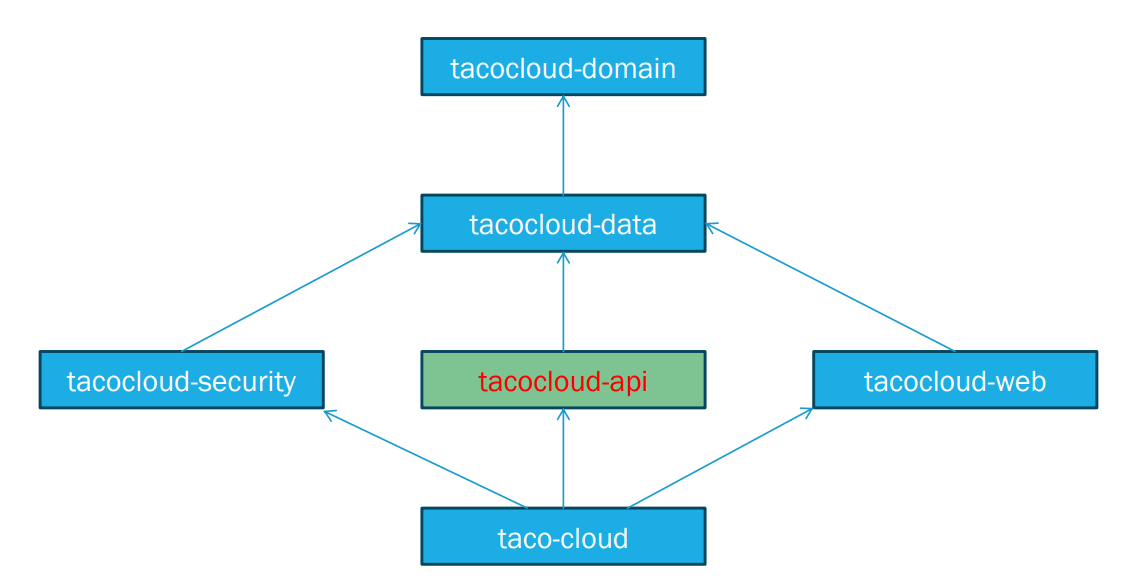
# 组件(模块)依赖关系
# 配置本地域名
- Windows: C:Windows(System32\drivers\etc\hosts
- Linux:T/etc/hosts
- 127.0.0.1 tacocloud 127.0.0.1 authserver
- 这样即便没有服务器也可以通过域名测试
# RESTful控制器实现
- REST API以面向数据的格式返回,JSON或XML
- 这些注解继续有用 @RequestMapping @GetMapping @PostMapping @PutMapping @DeleteMapping @PatchMapping
- @RestController,@ResponseBody,或返回ResponseEntity对象,TacoController
- @RequestMapping的produces属性
# 请求头与请求体
- 请求头:请求头由 key/value 对组成,每行为一对,key 和 value 之间通过冒号(:)分割。请求头的作用主要用于通 知服务端有关于客户端的请求信息。
- User-Agent:生成请求的浏览器类型
- *Accept:客户端可识别的响应内容类型列表;星号 用于按范围将类型分组。*/表示可接受全部类型,type/表示可接受 type 类型的 所有子类型。
- Accept-Language: 客户端可接受的自然语言
- Accept-Encoding: 客户端可接受的编码压缩格式
- Accept-Charset: 可接受的字符集
- Host: 请求的主机名,允许多个域名绑定同一 IP 地址
- connection:连接方式(close 或 keepalive)
- Cookie: 存储在客户端的扩展字段
- Content-Type:标识请求内容的类型
- Content-Length:标识请求内容的长度
- 请求体:请求体主要用于 POST 请求,与 POST 请求方法配套的请求头一般有 Content-Type和 Content-Length
# Accept取值
- text/html : HTML格式
- text/plain :纯文本格式
- text/xml : XML格式
- image/gif :gif图片格式
- image/jpeg :jpg图片格式
- image/png:png图片格式
- video/mpeg:视频
- vedio/quicktime:视频
- application/xhtml+xml :XHTML格式
- application/xml: XML数据格式
- application/atom+xml :Atom XML聚合格式
- application/json: JSON数据格式
- application/pdf:pdf格式
- application/msword: Word文档格式
- application/octet-stream: 二进制流数据(如常见的文件下载)
- application/x-www-form-urlencoded: < form encType=””>中默认的encType,form表单数据被编码为key/value格式发送到服务器(表单默认的提交数据的格式)
# 响应头与响应体 👍
- 状态行:由 HTTP 协议版本、状态码、状态码描述三部分构成,它们之间由空格隔开。
- 状态码:由 3 位数字组成,第一位标识响应的类型,常用的5大类状态码如下:
- 1xx:表示服务器已接收了客户端的请求,客户端可以继续发送请求
- 2xx:表示服务器已成功接收到请求并进行处理
- 3xx:表示服务器要求客户端重定向
- 4xx:表示客户端的请求有非法内容
- 5xx:标识服务器未能正常处理客户端的请求而出现意外错误
- 响应头
- Location:服务器返回给客户端,用于重定向到新的位置
- Server: 包含服务器用来处理请求的软件信息及版本信息Vary:标识不可缓存的请求头列表
- Connection: 连接方式, close 是告诉服务端,断开连接,不用等待后续的请求了。 keep-alive 则是告诉服务端,在完成本次请 求的响应后,保持连接
- Keep-Alive: 300,期望服务端保持连接多长时间(秒)
- 响应内容:服务端返回给请求端的文本信息。
# 消息转换器
- 使用注解@ResponseBody或类级@RestController,作用:指定使用消息转换器
- 没有model和视图,控制器产生数据,然后消息转换器转换数据之后的资源表述。
- spring自动注册一些消息转换器(HttpMethodConverter),不过类路径下要有对应转换能力的库,如: Jackson Json processor、JAXB库
- 请求传入,@RequestBody以及HttpMethodConverter
# 注释解释
# @CrossOrigin注解
- CORS ,Cross Origin Resource Sharing
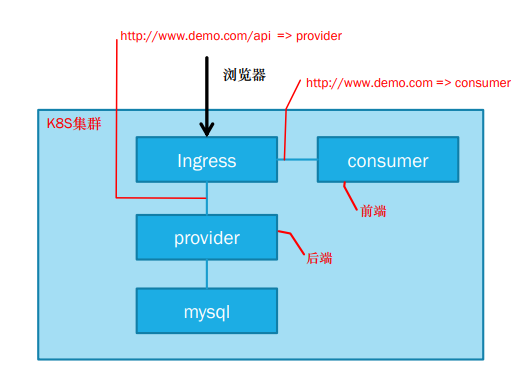
前端返回页面即浏览器访问consumer, 但又需要访问后端. 两者IP地址不同, 浏览器默认禁止跨域访问. 在Controller类上@CrossOrigin(<>)注明运行跨域访问的地址.
请求头内HOST字段会有主机域名和端口号
# @GetMapping
- recentTacos、tacoById方法实现
- http://tacocloud:8080/api/tacos/3
- @PathVariable
- 如果未查询到元素,返回状态码200,body返回null,如果不使用Optional类型,则返回状态码500
- 返回ResponseEntity
# @PostMapping
- postTaco方法实现
- consumes属性
- @RequestBody
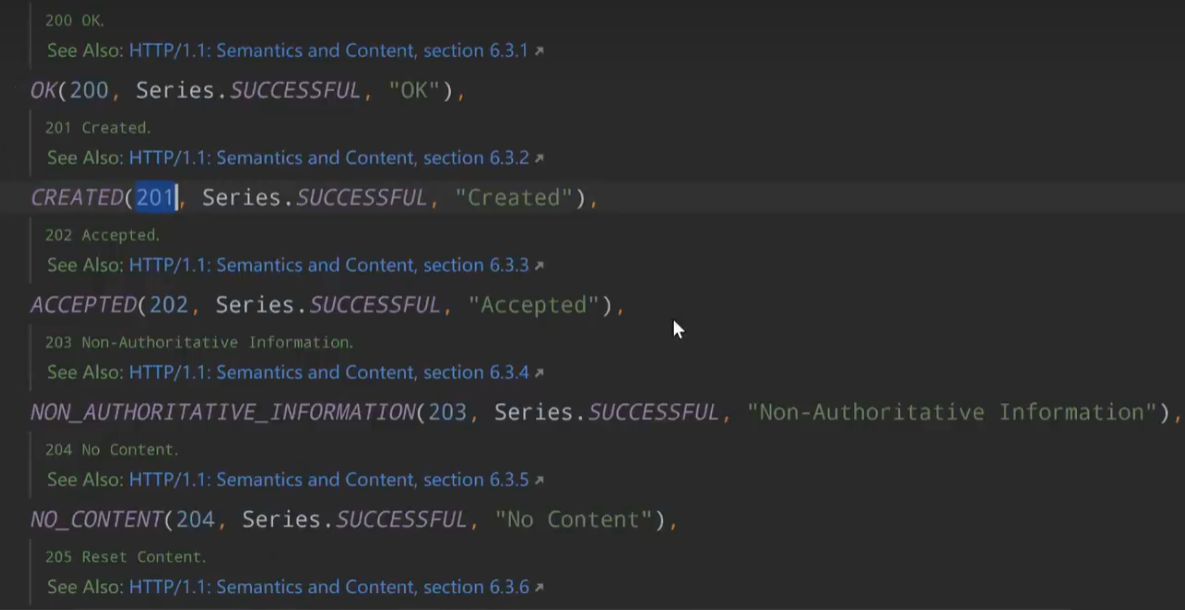
- @ResponseStatus,指定返回状态码
# 更多
- @PutMapping,putOrder方法实现,”将数据放到这个URL上“ 完全覆盖
- @PatchMapping,patchOrder方法实现,局部更新
- @DeleteMapping,deleteOrder方法实现,HttpStatus.NO_CONTENT,body不需要返回数据
# 接口设计 (考试必考)
- 使用标准HTTP动词:GET、PUT、POST、DELETE,映射到CRUD
- 使用URI来传达意图
- 例:请求一批资源复数,单个资源单数
- 推荐用名词
- 请求和响应使用JSON
- 使用HTTP状态码来传达结果
Create: 201No content: 204
# 将Spring Data存储库暴露为REST端点
# 添加依赖
<dependency>
    <groupId>org.springframework.boot</groupId>
    <artifactId>spring-boot-starter-data-rest</artifactId>
</dependency>
# Spring HEATEOAS项目
- 超媒体作为应用状态引擎(Hypermedia AsThe Engine Of Application State,HEATEOAS)
- 消费这个API的客户端可以使用这些超链接作为指南,以便于导航API并执行后续的请求
- 也会生成POST和PUT请求
# 设置API基础路径
spring:
	data:
		rest:
			base-path: /data-api
在application.yml中
spring:
  data:
    rest:
      base-path: /data-api
  datasource:
    generate-unique-name: false
    name: tacocloud
# 调整关系名和路径
@Data
@Entity
@RestResource(rel="tacos", path="tacos")
public class Taco {
}
# 分页和排序
# 测试和保护端点
# RestTemplate
- getForObject:只获取body
- getForEntity:获取完整responseEntity,可以获取headers
- postForObject、postForEntity、postForLocation
- put
- delete
- execute、exchange
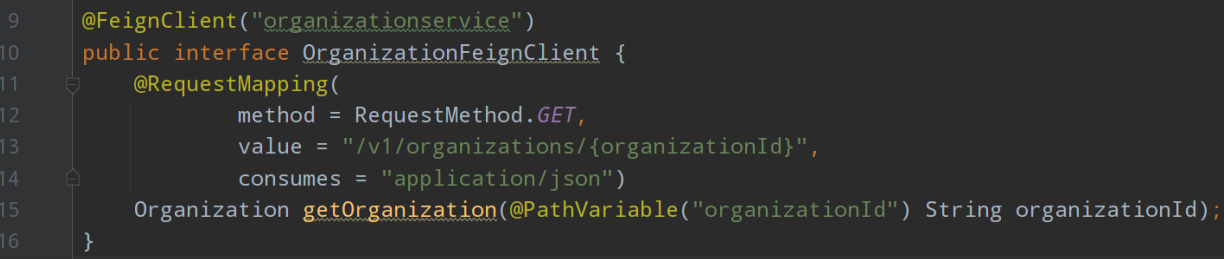
# 使用Feign调用REST API
<dependency>
    <groupId>org.springframework.cloud</groupId>
    <artifactId>spring-cloud-starter-feign</artifactId>
</dependency>
# 实例
# tacos
初始化数据库
package tacos;

import java.util.Arrays;

import org.springframework.boot.CommandLineRunner;
import org.springframework.context.annotation.Bean;
import org.springframework.context.annotation.Configuration;
import org.springframework.context.annotation.Profile;
import org.springframework.security.crypto.password.PasswordEncoder;

import tacos.Ingredient.Type;
import tacos.data.IngredientRepository;
import tacos.data.TacoRepository;
import tacos.data.UserRepository;

@Profile("!prod")
@Configuration
public class DevelopmentConfig {

  @Bean
  public CommandLineRunner dataLoader(
      IngredientRepository repo,
      UserRepository userRepo,
      PasswordEncoder encoder,
      TacoRepository tacoRepo) {
    return args -> {
      Ingredient flourTortilla = new Ingredient(
          "FLTO", "Flour Tortilla", Type.WRAP);
      Ingredient cornTortilla = new Ingredient(
          "COTO", "Corn Tortilla", Type.WRAP);
      Ingredient groundBeef = new Ingredient(
          "GRBF", "Ground Beef", Type.PROTEIN);
      Ingredient carnitas = new Ingredient(
          "CARN", "Carnitas", Type.PROTEIN);
      Ingredient tomatoes = new Ingredient(
          "TMTO", "Diced Tomatoes", Type.VEGGIES);
      Ingredient lettuce = new Ingredient(
          "LETC", "Lettuce", Type.VEGGIES);
      Ingredient cheddar = new Ingredient(
          "CHED", "Cheddar", Type.CHEESE);
      Ingredient jack = new Ingredient(
          "JACK", "Monterrey Jack", Type.CHEESE);
      Ingredient salsa = new Ingredient(
          "SLSA", "Salsa", Type.SAUCE);
      Ingredient sourCream = new Ingredient(
          "SRCR", "Sour Cream", Type.SAUCE);
      repo.save(flourTortilla);
      repo.save(cornTortilla);
      repo.save(groundBeef);
      repo.save(carnitas);
      repo.save(tomatoes);
      repo.save(lettuce);
      repo.save(cheddar);
      repo.save(jack);
      repo.save(salsa);
      repo.save(sourCream);

      userRepo.save(new User("habuma", encoder.encode("password"),
          "Craig Walls", "123 North Street", "Cross Roads", "TX",
          "76227", "123-123-1234"));

      Taco taco1 = new Taco();
      taco1.setName("Carnivore");
      taco1.setIngredients(Arrays.asList(
              flourTortilla, groundBeef, carnitas,
              sourCream, salsa, cheddar));
      tacoRepo.save(taco1);

      Taco taco2 = new Taco();
      taco2.setName("Bovine Bounty");
      taco2.setIngredients(Arrays.asList(
              cornTortilla, groundBeef, cheddar,
              jack, sourCream));
      tacoRepo.save(taco2);

      Taco taco3 = new Taco();
      taco3.setName("Veg-Out");
      taco3.setIngredients(Arrays.asList(
              flourTortilla, cornTortilla, tomatoes,
              lettuce, salsa));
      tacoRepo.save(taco3);
    };
  }

}
调用其他的model:添加依赖
<dependency>
    <groupId>sia</groupId>
    <artifactId>tacocloud-api</artifactId>
    <version>${tacocloud.version}</version>
</dependency>
# 根目录
根目录下的xml指定了所有的model,外层为project
<modules>
    <module>tacocloud</module>
    <module>tacocloud-api</module>
    <module>tacocloud-data</module>
    <module>tacocloud-domain</module>
    <module>tacocloud-security</module>
    <module>tacocloud-web</module>
</modules>
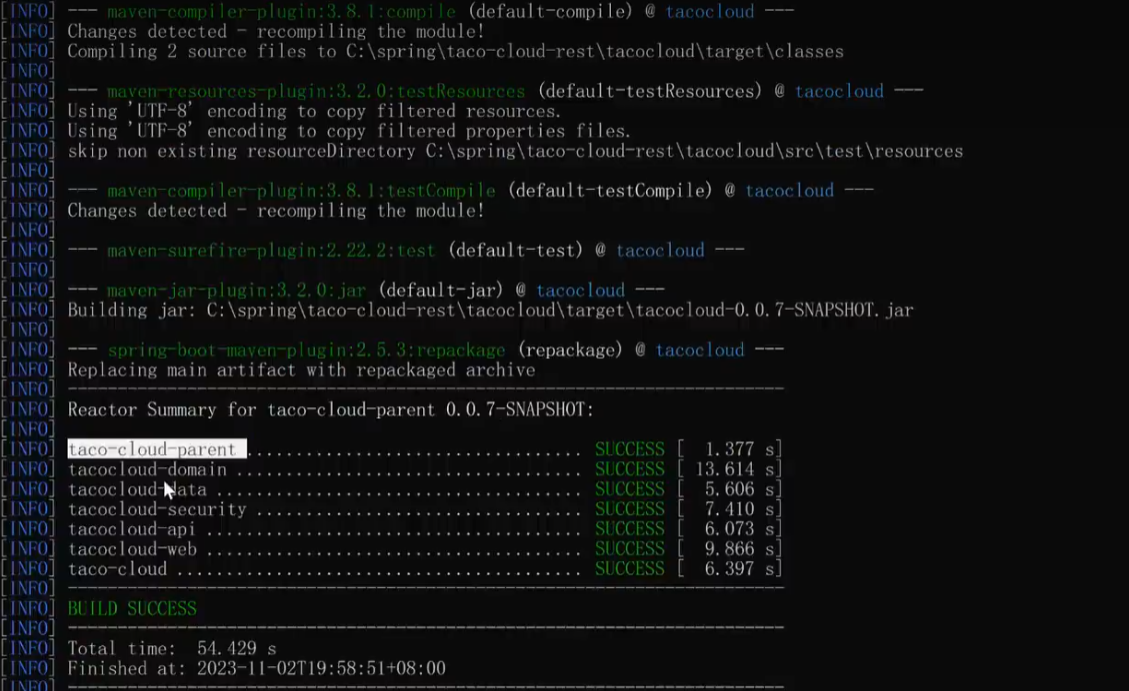
构建过程:自动完成model之间依赖的构建
mvn clean package
java -jar tacocloud/target/tacocloud-0.0.7-SNAPSHOT.jar
先后顺序见下图
# tacocloud-API(重点)
controller
package tacos.web.api;

import java.util.Optional;

import org.springframework.data.domain.PageRequest;
import org.springframework.data.domain.Sort;
import org.springframework.http.HttpStatus;
import org.springframework.web.bind.annotation.CrossOrigin;
import org.springframework.web.bind.annotation.GetMapping;
import org.springframework.web.bind.annotation.PathVariable;
import org.springframework.web.bind.annotation.PostMapping;
import org.springframework.web.bind.annotation.RequestBody;
import org.springframework.web.bind.annotation.RequestMapping;
import org.springframework.web.bind.annotation.ResponseStatus;
import org.springframework.web.bind.annotation.RestController;

import tacos.Taco;
import tacos.data.TacoRepository;

@RestController
@RequestMapping(path="/api/tacos",                      // <1>
                produces={"application/json"})
@CrossOrigin(origins="http://tacocloud:8080")        // <2>
public class TacoController {
  private TacoRepository tacoRepo;

  public TacoController(TacoRepository tacoRepo) {
    this.tacoRepo = tacoRepo;
  }

  @GetMapping(params="recent")
  public Iterable<Taco> recentTacos() {                 //<3>
    PageRequest page = PageRequest.of(
            0, 12, Sort.by("createdAt").descending());
    return tacoRepo.findAll(page).getContent();
  }

  @PostMapping(consumes="application/json")
  @ResponseStatus(HttpStatus.CREATED)
  public Taco postTaco(@RequestBody Taco taco) {
    return tacoRepo.save(taco);
  }

  @GetMapping("/{id}")
  public Optional<Taco> tacoById(@PathVariable("id") Long id) {
    return tacoRepo.findById(id);
  }

  /*
  @GetMapping("/{id}")
  public ResponseEntity<Taco> tacoById(@PathVariable("id") Long id) {
    Optional<Taco> optTaco = tacoRepo.findById(id);
    if (optTaco.isPresent()) {
      return new ResponseEntity<>(optTaco.get(), HttpStatus.OK);
    }
    return new ResponseEntity<>(null, HttpStatus.NOT_FOUND);
  }
  */
}
- @RestController:当前控制器所有方法的返回,都需要转为json格式串
- @ResponseStatus(HttpStatus.CREATED):
- RequestParam:查询参数
- @PathVariable(“id”):路径参数
# taco-domain
package tacos;
import java.util.ArrayList;
import java.util.Date;
import java.util.List;

import javax.persistence.Entity;
import javax.persistence.GeneratedValue;
import javax.persistence.GenerationType;
import javax.persistence.Id;
import javax.persistence.ManyToMany;
import javax.persistence.PrePersist;
import javax.validation.constraints.NotNull;
import javax.validation.constraints.Size;

import org.springframework.data.rest.core.annotation.RestResource;

import lombok.Data;

@Data
@Entity
@RestResource(rel="tacos", path="tacos")
public class Taco {

  @Id
  @GeneratedValue(strategy=GenerationType.AUTO)
  private Long id;

  @NotNull
  @Size(min=5, message="Name must be at least 5 characters long")
  private String name;

  private Date createdAt;

  @ManyToMany(targetEntity=Ingredient.class)
  @Size(min=1, message="You must choose at least 1 ingredient")
  private List<Ingredient> ingredients = new ArrayList<>();

  @PrePersist
  void createdAt() {
    this.createdAt = new Date();
  }

  public void addIngredient(Ingredient ingredient) {
    this.ingredients.add(ingredient);
  }
}
- @RestResource(rel=“tacos”, path=“tacos”):如果我不想要spring自动给taco的复数列表生成路径为“tacoes”,我可以自己指定为”tacos“
# taco-restclient
即可在java后端中调用api
package tacos.restclient;

import java.util.Collection;
import java.util.List;

import org.springframework.core.ParameterizedTypeReference;
import org.springframework.hateoas.CollectionModel;
import org.springframework.hateoas.client.Traverson;
import org.springframework.http.HttpMethod;
import org.springframework.stereotype.Service;
import org.springframework.web.client.RestTemplate;

import lombok.extern.slf4j.Slf4j;
import tacos.Ingredient;
import tacos.Taco;

@Service
@Slf4j
public class TacoCloudClient {

  private RestTemplate rest;
  private Traverson traverson;

  public TacoCloudClient(RestTemplate rest, Traverson traverson) {
    this.rest = rest;
    this.traverson = traverson;
  }

  //
  // GET examples
  //

  /*
   * Specify parameter as varargs argument
   */
  public Ingredient getIngredientById(String ingredientId) {
    return rest.getForObject("http://tacocloud:8080/data-api/ingredients/{id}",
                             Ingredient.class, ingredientId);
  }

  /*
   * Alternate implementations...
   */

  /*
   * Specify parameters with a map
   */
  /*
  public Ingredient getIngredientById(String ingredientId) {
    Map<String, String> urlVariables = new HashMap<>();
    urlVariables.put("id", ingredientId);
    return rest.getForObject("http://tacocloud:8080/ingredients/{id}",
        Ingredient.class, urlVariables);
  }
  */

  /*
   * Request with URI instead of String
   */
  /*
  public Ingredient getIngredientById(String ingredientId) {
    Map<String, String> urlVariables = new HashMap<>();
    urlVariables.put("id", ingredientId);
    URI url = UriComponentsBuilder
              .fromHttpUrl("http://tacocloud:8080/ingredients/{id}")
              .build(urlVariables);
    return rest.getForObject(url, Ingredient.class);
  }
  */

  /*
   * Use getForEntity() instead of getForObject()
   */
  /*
  public Ingredient getIngredientById(String ingredientId) {
    ResponseEntity<Ingredient> responseEntity =
        rest.getForEntity("http://tacocloud:8080/ingredients/{id}",
            Ingredient.class, ingredientId);
    log.info("Fetched time: {}",
            responseEntity.getHeaders().getDate());
    return responseEntity.getBody();
  }
  */

  public List<Ingredient> getAllIngredients() {
    return rest.exchange("http://tacocloud:8080/api/ingredients",
            HttpMethod.GET, null, new ParameterizedTypeReference<List<Ingredient>>() {})
        .getBody();
  }
//        List<Product> products = restTemplate.exchange("/products", HttpMethod.GET, null, new ParameterizedTypeReference<List<Product>>() {
  //
  // PUT examples
  //

  public void updateIngredient(Ingredient ingredient) {
    rest.put("http://tacocloud:8080/data-api/ingredients/{id}",
          ingredient, ingredient.getId());
  }

  //
  // POST examples
  //
  public Ingredient createIngredient(Ingredient ingredient) {
    return rest.postForObject("http://tacocloud:8080/data-api/ingredients",
        ingredient, Ingredient.class);
  }

  /*
   * Alternate implementations...
   * The next two methods are alternative implementations of
   * createIngredient() as shown in chapter 6. If you'd like to try
   * any of them out, comment out the previous method and uncomment
   * the variant you want to use.
   */
  /*
  public java.net.URI createIngredient(Ingredient ingredient) {
    return rest.postForLocation("http://tacocloud:8080/ingredients",
        ingredient);
  }
  */

  /*
  public Ingredient createIngredient(Ingredient ingredient) {
    ResponseEntity<Ingredient> responseEntity =
           rest.postForEntity("http://tacocloud:8080/ingredients",
                              ingredient,
                              Ingredient.class);
    log.info("New resource created at {}",
             responseEntity.getHeaders().getLocation());
    return responseEntity.getBody();
  }
  */

  //
  // DELETE examples
  //

  public void deleteIngredient(Ingredient ingredient) {
    rest.delete("http://tacocloud:8080/data-api/ingredients/{id}",
        ingredient.getId());
  }

  //
  // Traverson with RestTemplate examples
  //

  public Iterable<Ingredient> getAllIngredientsWithTraverson() {
    ParameterizedTypeReference<CollectionModel<Ingredient>> ingredientType =
        new ParameterizedTypeReference<CollectionModel<Ingredient>>() {};

    CollectionModel<Ingredient> ingredientRes =
        traverson
          .follow("ingredients")
          .toObject(ingredientType);

    Collection<Ingredient> ingredients = ingredientRes.getContent();
    return ingredients;
  }

  public Ingredient addIngredient(Ingredient ingredient) {
    String ingredientsUrl = traverson
        .follow("ingredients")
        .asLink()
        .getHref();

    return rest.postForObject(ingredientsUrl,
                              ingredient,
                              Ingredient.class);
  }

  public Iterable<Taco> getRecentTacosWithTraverson() {
    ParameterizedTypeReference<CollectionModel<Taco>> tacoType =
        new ParameterizedTypeReference<CollectionModel<Taco>>() {};

    CollectionModel<Taco> tacoRes =
        traverson
          .follow("tacos")
          .follow("recents")
          .toObject(tacoType);

    Collection<Taco> tacos = tacoRes.getContent();
    // Alternatively, list the two paths in the same call to follow()
    /*
    CollectionModel<Taco> tacoRes =
       traverson
         .follow("tacos", "recents")
         .toObject(tacoType);
    */
    return tacos;
  }

}